How I gave my whole team a coding agent inside Slack
People keep asking me what I use Hermes for.
I usually try to answer in a WhatsApp message or a LinkedIn reply. Then I get halfway through listing the things it does and realise I am writing an essay again.
The problem is that there is no single use case. My team uses it to build landing pages, create graphics and videos, make interactive presentations, research campaigns, find journalists, write pitches, work through spreadsheets, monitor the news, fix code and deploy things. I use a separate private version for sales outreach, lead generation, email, cleaning up inbox clutter, documents, research, admin, travel planning and whatever odd job I would otherwise hand to a very capable technical assistant.
It even has its own emulated Android phone, so I can ask it to order an Uber, get dinner delivered when I am feeling lazy or buy groceries from Norway's online supermarket, all from a voice note on my Apple Watch while I am out walking.
So I decided to write this note to answer all the questions I get about it.
The short answer: I put a coding agent in Slack
You may have heard about OpenClaw when it was all the rage. I looked at the same category and came away preferring Hermes Agent by a wide margin. OpenClaw has done a lot of security work since its early issues, but its own documentation still describes a trusted-operator model rather than a hard multi-user security boundary. For the shared team setup I wanted, I found Hermes significantly better suited and easier to secure with separate hosts, scoped tools and explicit approval boundaries.
Hermes is an open-source agent that connects frontier models to tools, files, browsers, code, memory and messaging platforms.
Some technical people do not immediately see the point of Hermes. I understand the argument: I am comfortable in a terminal, spend 12 hours or more there on many days and now even carry my tmux in my pocket. But Hermes is unlike a terminal agent because its interface can be whatever people already use. I can send it a WhatsApp or iMessage voice note while I am walking and kick off a long chain of research, coding and real-world tasks. A non-technical teammate can do the same in Slack by messaging Ava as they would any other colleague, without touching a terminal, configuring API keys or understanding the machinery underneath. That reduction in friction is not a convenience around the edges. It is the point.
Our team version is called Ava. She lives in our company Slack. Anyone on the team can mention @Ava in a channel and ask for something in ordinary language.
That sounds like a chatbot until you watch what happens next.
A teammate can describe a landing page for a client. Ava can research the subject, scrape and structure data, write the copy, create the HTML and CSS, make graphics, run the page in a browser, inspect what looks wrong, fix it and deploy a preview to Cloudflare Pages or Vercel. The teammate never opens a terminal, clones a repository, downloads VS Code or learns what a deployment pipeline is. They stay in the same Slack thread where the idea began.
That is the part I find transformative. My agency team is not technical in the traditional sense. They work in digital PR, content, research and creative production. Giving them Ava is roughly like giving everyone access to Claude Code or Codex without asking them to learn the terminal, install an IDE or become vibe developers first.
Slack becomes the interface. A mention becomes the command line.
Our logs show that this has moved well beyond an experiment. Over the last 60 days, Ava received about 6,600 inbound Slack messages across 53 of the 60 days. Hermes recorded 3,017 session rows in that window. The pattern is clear. Usage has stayed substantial every week and it shows a real shift in how the agency works.
What the team actually asks Ava to do
The range is much wider than I expected when I set it up.
Landing pages and interactive campaign assets have become one of the biggest uses. The team asks Ava to turn a campaign idea into something a journalist or client can actually open. That can mean a data-led microsite, a route explorer, an interactive PR asset or a polished client landing page. The work often includes research, copy, code, SVGs, responsive layouts, browser checks, visual iterations and a live preview URL.
On one recent day, several people were building separate client campaigns at the same time. They were giving screenshot feedback on interactive maps, rankings and data-led pages while Ava revised and redeployed each version. This was happening through normal Slack threads, not an engineering interface.
One campaign began as a methodology and ranking spreadsheet. Ava turned it into a searchable interactive page with comparisons and adjustable weighting, then tested it in a browser. A strategist replied with a Tagalog voice note pointing out confusing motion, inconsistent fonts, glitching cards, spacing and branding changes. Ava kept iterating in the same public thread. A non-technical teammate was art-directing a coded interactive by voice while the rest of the company could watch and learn from the process.
The same pattern has worked internally. One of the earliest heavy sessions started with an existing all-hands deck and its assets attached in Slack. Ava pulled it apart, built a new interactive web deck, deployed it to Cloudflare Pages and then turned what she learned into a reusable skill for future company presentations.
We now build all-company presentations and most client pitches as Next.js apps instead of treating slides as flat pages. We can embed full websites, interactive campaign assets, live demos, animation and anything else the browser can render. They feel much closer to a small interactive experience than a Google Slides deck. The team can ask for changes in Slack, review the deployed version and keep improving it without learning the underlying framework. A one-off deliverable became a capability the rest of the team could call again.
Ava has also found her way into the softer parts of company life. One teammate turned a casual idea for a two-minute daily brain game into Agency Arcade: a public Slack ritual with a rotating puzzle page, a hidden question bank, scheduled launches, automatic scoring and weekly winners. The teammate uses Ava to plan the rotation, check questions, tune difficulty, recover missed launches and think through whether the scoring stays fair and motivating.
It might sound minor next to building client software, but it matters. The interesting part is watching a non-technical owner make product decisions about difficulty, fairness and social energy, then operate the whole system from Slack. Adoption grows faster when the agent is part of enjoyable shared rituals as well as serious work.
Creative production is another heavy category. Ava has produced and iterated social graphics, carousel posts, Facebook cover art, campaign visuals and correctly sized PNG exports. People can attach an image, explain what feels wrong and continue refining it in the thread. Ava can check dimensions and inspect the final file instead of stopping at a text description.
We have also connected Seedance for video generation. That means a teammate can move from an idea for a Meta ad to generated video without leaving Slack.
These workflows often cross categories. Ava might generate the images, build the interactive tool that uses them and then update the surrounding copy on the real website. Our sites are connected to GitHub and Forgejo repositories, where she has contributor access. That means the team can ask for a copy or content change in Slack and have Ava prepare a pull request instead of messaging me and turning it into a ticket for somebody else. The same review boundary still applies: contributor access lets her do the work, not silently decide what reaches production.
For PR work, the team uses her to find campaign angles, turn public data into ideas, research seasonal hooks, draft journalist responses and improve expert commentary. We have connected external media databases through MCPs, which means Ava can search, inspect, filter and export journalists into regional or campaign-specific media lists without somebody copying results between five tabs. The 60-day logs contain hundreds of journalist searches and additions spread across roughly a month of active media-list work. These are not demo queries. Some of the spreadsheet and editorial-review threads run for hundreds of messages.
We also turned our pitch-review process into a dedicated Slack skill. Instead of hoping the model remembers how our team judges a pitch, the workflow carries the structure and standards with it. The current dashboard shows that skill being used hundreds of times in the last month. This is one of the better examples of team judgment becoming reusable infrastructure.
She also reads the files people already work in. A teammate can attach a PDF, PowerPoint, spreadsheet, CSV, ZIP or Word document in Slack. Ava can extract it, analyse it and use it as part of the job. She can work with our Google Docs and Sheets too, which has made her useful inside existing PR and admin workflows rather than forcing everyone into a new system. She even helps with accounting and filing receipts into our accounting system.
Then there is the background work. Scheduled jobs deliver trend briefings, news monitoring, client alerts and recurring reports into the relevant Slack channels. The useful information arrives where the team is already talking about the client. Nobody has to remember to open another dashboard every morning.
One of those systems came from the team in the Philippines. On their own initiative, they asked Ava to build PH Dispatch, an automated safety monitor for earthquakes, typhoons and other severe weather. It watches official sources such as PHIVOLCS and PAGASA, then posts a short advisory in Slack with where and when it is happening, why it matters, what people should do and a link to the source.
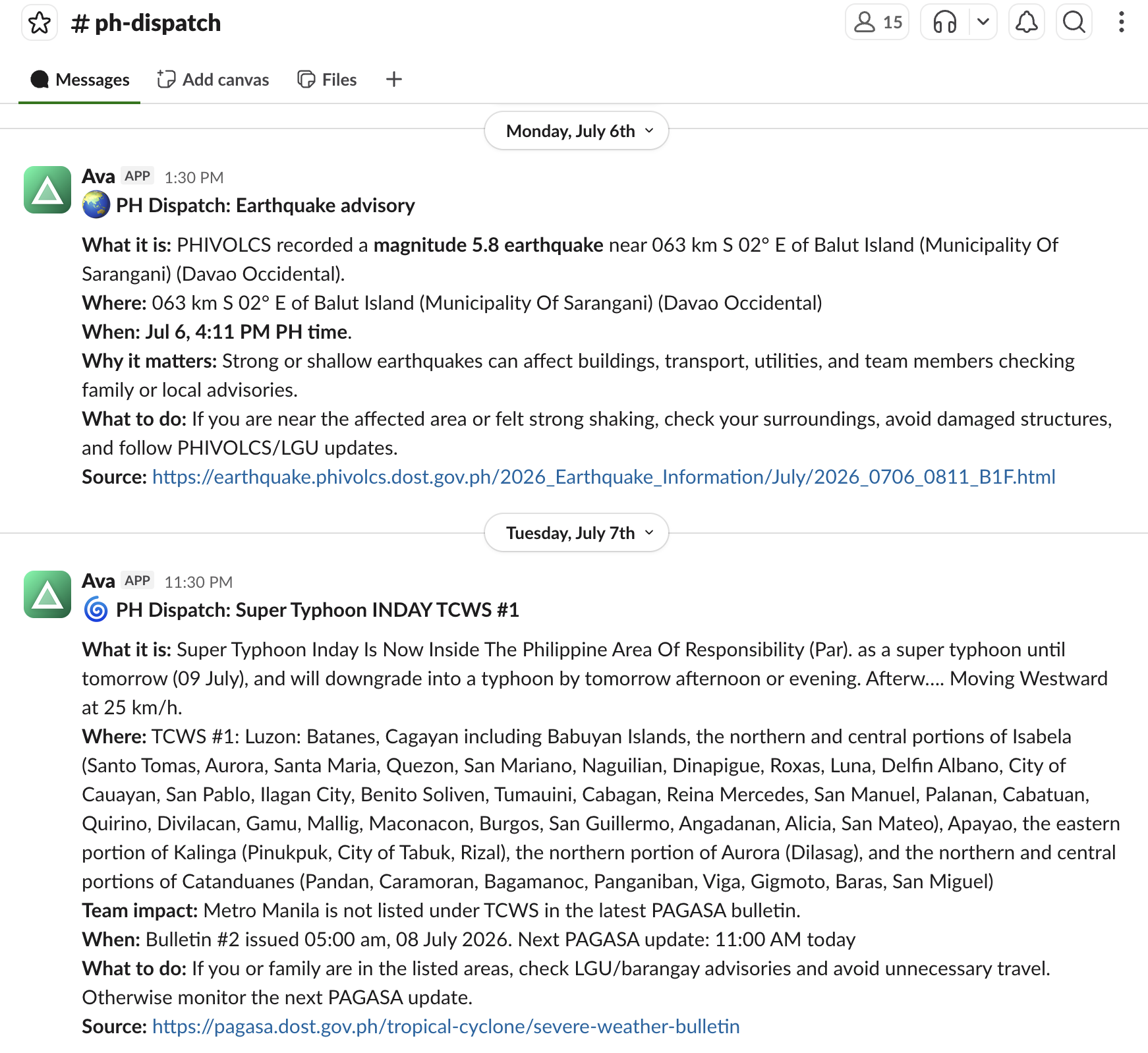
This was not an assignment from me. The team saw something that could help them and their families stay informed, then used the agent to build it. I like this example because it is small, practical and completely theirs.
When the task touches our own software, Ava can move from discussion to engineering. She can investigate an issue, work on an allowlisted repository, run tests and browser checks, open a pull request and ask me to review it. She cannot merge her own work or push directly to the main branch. That boundary is deliberate.
The team has used that path on our own internal agency dashboard too. A teammate identified a feature the product needed, worked through the behaviour with Ava, tested the implementation in a private preview and sent screenshots when the details were wrong. Ava wrote the API and interface, ran the tests and production build, then prepared the work for review. I still had the final review and deployment decision, but the need and most of the solution came directly from the people who use the product. A non-technical teammate had gone from spotting a problem to developing a tested feature without waiting for an engineering queue.
The common thread is that an idea does not have to wait for a technical handoff. The person closest to the problem can start building immediately.
We even built the adoption dashboard with the thing it measures
As Ava spread through the team, I asked whether she could track how many people were using her. Two days later I asked for something more useful: individual adoption, a leaderboard, task types and a way to see how a remote team was actually working with the agent.
I said "LFG" in the Slack thread. Ava inspected her own local session database and gateway logs, built an exporter and a static dashboard, then deployed it to Cloudflare Pages.
Then I treated Ava like the product engineer she had just become. I pointed out that the last-active values were stale and the charts looked wrong. She traced the timestamp problem to long-running session records, overlaid live Slack gateway events, added 7, 14 and 30-day views, fixed the chart layout and redeployed it. Later, when the scheduled refresh timed out during deployment, she changed the schedule and timeout. It has refreshed successfully every day since.
The current view shows around 18 active users, 1,927 agent sessions and 1,370 Slack-sourced sessions. It estimates that more than 90 percent of sessions use an advanced tool such as web research, files, code, browsers or deployments.
There is something pleasingly recursive about using the agent to build the dashboard that shows us how we use the agent. More importantly, it gives us a useful loop. We can see a workflow becoming popular, look at the public Slack threads behind it, learn what is working and turn the best patterns into guidance for everyone else.
The numbers matter less than the change underneath them. At first, a few curious people tried Ava. Now the team treats her as a normal place to start work. People tag her, tag each other into the same thread, correct the output, add client context and pick up where somebody else left off.
The important part is that it happens in public
This setup was originally inspired by Tobi Lütke's description of River at Shopify.
River works in public Slack channels and declines direct messages. Tobi described the result using the German word Lehrwerkstatt, a teaching workshop where people learn by being close to the work.
We adopted the same basic idea for Ava. Her system prompt tells her to work in public channels and redirect private requests back into the open. It is a policy rather than an unbreakable technical wall, but it has been enough to shape the culture around her.
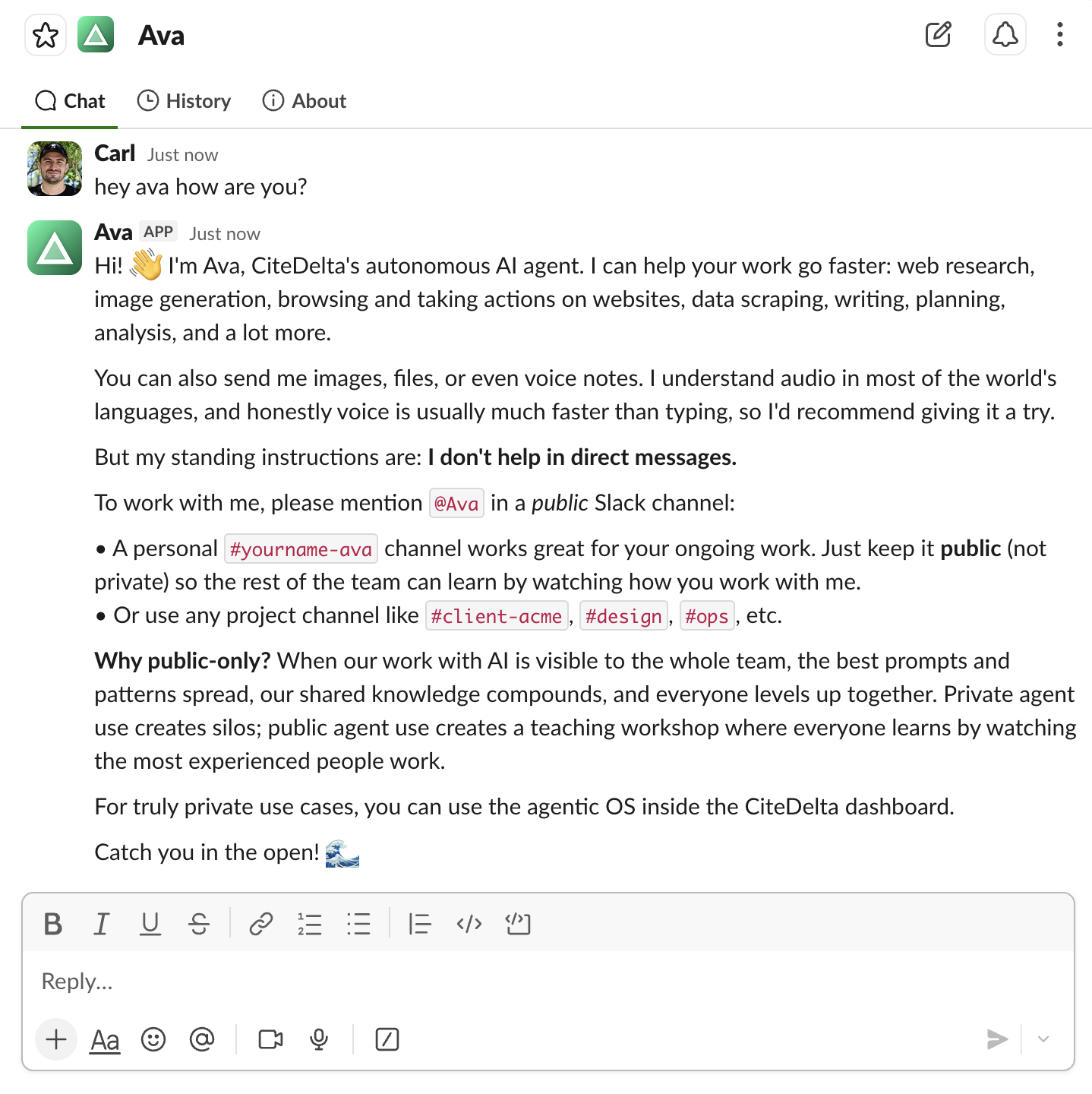
At first, public agent conversations can feel strange. People are used to asking tools questions in private. But private work disappears. Nobody sees the prompt, the correction, the good bit of judgment or the mistake that taught you something.
In a shared channel, all of that becomes reusable.
A colleague can see how somebody scoped a landing page and borrow the pattern the next day. A PR specialist can add context while Ava is researching an angle. A designer can point out why a graphic is not working, then everyone in the thread sees the correction. Someone can tag the person who knows the client best instead of trying to relay their knowledge later.
The agent is useful because it can build. The channel is useful because everyone can learn from the build.
This has made the whole team more comfortable with agents. There was no formal training programme. People watched good work happen, tried their own version and learned what to ask for. The interface was already familiar, so the learning went into judgment and prompting rather than software setup.
What makes Ava different from adding a bot to Slack
A normal Slack bot answers from whatever knowledge was packed into it. Ava can plan, act, problem-solve and use tools.
She has a browser, web search and extraction, code execution, file tools, GPT Image 2, optional Seedance video generation, Google Workspace access, selected repositories, deployment tools, Honcho memory and a set of skills that explain how our own workflows work. Those permissions are not all-or-nothing. Each integration has its own boundary.
For example, Ava can create and edit files in a dedicated Google Shared Drive, but she cannot delete files, change sharing permissions or wander through everybody's Gmail. Her GitHub App only sees selected repositories. Her code workflow creates a branch and a pull request, then waits for a human. Cloudflare deployments go into a separate AI workspace that cannot touch our main production account.
This is the part people skip when they imagine setting up an agent for a team. The model matters, but the useful system is the model plus tools, context, permissions, memory, monitoring and a clear place for human review.
You want to give the agent enough capability to finish real work while containing the consequences when it gets something wrong.
The memory layer
Both of my agents use a self-hosted Honcho memory service. It runs separately from the agents with Postgres, pgvector and Redis behind it.
The practical effect is that Ava can remember durable information about how we work without stuffing every old conversation into every new prompt. Honcho keeps a compact representation of the team and retrieves specific relevant memories when needed. It can consolidate repeated facts, update information that has changed and stop relying on details that have been superseded.
That means a correction can become useful beyond the thread where it happened. If the team repeatedly establishes a preference, client constraint or working pattern, Ava can carry the relevant part into later work.
The memory spaces for Ava and my private agent are isolated with separate credentials. Ava's memory is intentionally shared across the team, though, which creates a simple rule: do not tell the team agent anything you would not want the team to know.
Self-hosting the database gives us control over where the memory is stored. It does not mean every part of inference is local. The models and some memory processing still use cloud providers. I would rather be clear about that than call the system fully private when it is not.
I run a separate one for myself
My private Hermes is called Nova. Ava is the communal shop floor. Nova is my private workshop and control room.
Nova runs on the always-on Mac mini I wrote about in my remote agent setup. I can reach her through Slack, WhatsApp, iMessage or the command line. She has broader tools than Ava because the only user is me.
I also use Nova to manage the agent infrastructure itself. She has helped me move services between machines, update my Linux servers and work out how to give our coding agents safe access to the same tools. She can use an emulated Android device to book me an Uber or order groceries from a voice note I dictated into my Apple Watch.
This is why I struggle when somebody asks for the use case. One day it is an insurance document. The next it is a Google Sheet, a podcast or YouTube channel transcript, a server problem or a piece of research I want turned into something useful. The value is not one specialised workflow. It is having a capable operator available in the places where I already communicate.
How it is set up
There are two logically separate Hermes instances.
Nova runs on my Mac mini. Ava runs on a dedicated Proxmox virtual machine for the team. Ava's web search, extraction, browser and memory services run on separate supporting VMs. The browser is isolated because running arbitrary web code is one of the riskiest things the system does. The split also means a problem in the team agent does not expose my private sessions or credentials.
At the time of writing, both agents use OpenAI's Codex backend with GPT-5.6 Sol at medium reasoning effort by default, through my Codex 20x subscription. We also built a function that lets people switch a session to GLM 5.2 or DeepSeek with a slash command in Slack. We have changed models before and will change them again. The bigger improvement has come from better tools, better boundaries and the team writing down what good work looks like.
The gateways stay online and listen to Slack. Scheduled jobs run in the background. Logs and session metadata let us inspect usage and failures. Services restart after reboots. Cleanup jobs stop browser caches, old sessions and forgotten development servers from slowly eating the machines.
It took real operational work to make this dependable. We have filled a disk, hit an out-of-memory crash, found a service that did not return after a Proxmox reboot and caught a memory process silently dropping most of what it should have stored. Each incident produced another monitor, limit or recovery rule.
An autonomous agent still needs boring infrastructure.
The bits that still go wrong
This is not a magic employee in a box.
Browser automation can be flaky until you figure it out. Some sites block agents and require more creative solutions. Long Slack responses can hit message limits. Huge threads become expensive and difficult to reason over. A scheduled task cannot ask a human for approval in the same way an interactive conversation can, so its permissions need more care.
Costs need attention too. We rolled out Seedance video generation for one team member who was experimenting with Meta video ads. I woke up the next morning to roughly a $600 OpenRouter API bill.
The agent also needs human taste. A generated page still needs somebody who understands the client to look at it. A media list needs a PR person to judge relevance. A pull request needs review. Public channels help here because the right people can join while the work is happening.
The most effective pattern we have found is one dedicated thread per deliverable, with the files and context attached up front. Clear threads produce better work and make the result easier for somebody else to understand later.
What changed for the team
Before Ava, an idea that required code had to cross a gap. Somebody described it, somebody else interpreted it, and eventually a technical person might have time to build it.
Now the person with the idea can make the first working version themselves. They can show it to a colleague in the same thread, improve it with Ava and bring in technical review when it becomes necessary.
That does not turn every teammate into a software engineer. It gives them access to software-engineering capability at the moment it is useful.
For a PR and marketing agency, that changes what feels possible. A campaign does not have to end as a deck describing an interactive idea. The team can build the interactive idea. Research does not have to stop at a spreadsheet. It can become a searchable asset, a visual, a landing page or a recurring alert.
The biggest shift is confidence. People who would never open a terminal now assume they can try to build something. They have watched other people do it in Slack often enough that asking an agent to create and deploy a page no longer feels exotic.
If you want to set up something similar
I have written an agent-ready setup guide you can hand directly to a capable coding agent: the Hermes Slack agent playbook. It covers a dedicated Mac mini, Proxmox VM or hosted Linux server, plus Slack, models, tools, permissions, memory, system prompts, services, backups and the checks that stop a powerful agent from becoming a security problem.
I would not begin by giving an agent access to everything.
Start with one public channel and one workflow people already repeat. Give the agent the smallest set of tools needed to finish that workflow. Keep consequential actions behind human review. Watch where it gets stuck, then turn the useful corrections into instructions, skills or memory.
Make the work visible. That is where the compounding effect comes from.
The model will improve. The tools will improve. The part you are really building is the shared habit of showing the agent what good work looks like, in a place where everybody else can learn from it too.
That is what Hermes has become for us. Not a chat window, and not a replacement for the team. It is a way for the team to turn ideas into working things without waiting for the usual handoffs, while learning from each attempt in public.
And now, when somebody asks me what I use it for, I can send them this instead of typing another enormous WhatsApp message.
Fun fact: Hermes researched, wrote and deployed this entire post from its own logs after I sent it a voice note from the toilet because I was tired of answering the same question on WhatsApp.